

Problem background
Integration problem:
In modern data integration, managing small, frequent data updates is crucial, especially when working with cloud data platforms like Snowflake. This common scenario arises when an API continuously sends small batches of data that need to be inserted or updated in a target table. These batches, though containing only a few records each, arrive in rapid succession, often within short bursts of API requests. This high frequency of incoming data can strain the system, making it difficult to ensure smooth, consistent updates.
The challenge is further compounded by the requirement for an UPSERT operation. As the volume of API requests grows, so does the complexity of managing these concurrent inserts and updates efficiently in Snowflake.
Initial Design
The process requires performing UPSERT operations (insert and update) based on incoming data, which often arrive in bursts. To optimize this process, we focus on an approach involving using semi-structured data types like VARIANT to offload the complexity of data processing onto Snowflake as much as possible. Here’s a breakdown of the two key design steps for an implementation:
1. Insert Data into a Table with a VARIANT Column
Since Snowflake is particularly well-suited for working with semi-structured data, we decided to store incoming data in a VARIANT column. The flexibility of the VARIANT data type allows Snowflake to handle complex, hierarchical data formats such as JSON, or XML. By storing API payloads directly in a VARIANT column, we could offload the initial processing to Snowflake.
Insert into TEST_DB.TEST_SCHEMA.Item (ID, "Name")
SELECT src:itemId, src:name FROM TEST_DB.TEST_SCHEMA.source_system where transactionId = '123789';
This design also allowed us to handle raw API requests in their native format, eliminating the need for complex data transformations at the integration layer.
2. Use the MERGE Function to Transfer Data from VARIANT Column to Target Table
The next step was to transform and load the data from the VARIANT column into the target table using the MERGE function. Snowflake’s MERGE operation is ideal for performing UPSERTs (inserts or updates), which is essential in our scenario where records are updated if they already exist or inserted if they are new. The MERGE function allows Snowflake to handle these operations in a streamlined, efficient manner, optimizing both inserts and updates.
MERGE INTO TEST_DB.TEST_SCHEMA.ITEM USING (SELECT *  FROM TEST_DB.TEST_SCHEMA.source_system where transactionId = '123789') AS newItem ON ITEM.ID = newItem.src:itemId
  WHEN MATCHED THEN UPDATE SET ITEM.ID = newItem.src:itemId, ITEM."Name" = newItem.src:name
  WHEN NOT MATCHED THEN INSERT ("ID", "Name") VALUES (newItem.src:itemId, newItem.src:name);
The Problem We Encountered
While this design was promising, we ran into a significant issue during implementation. Specifically, we encountered a roadblock when trying to access the VARIANT attributes via the JDBC and MuleSoft connectors. The error message we received was:
“Bulk query cannot contain a parameterized SQL query.”
This issue arose when attempting to run the MERGE operation through the integration layer. The root of the problem appeared to be that Snowflake’s MERGE function is not able to handle complex data types, such as VARIANT or OBJECT, through the JDBC or MuleSoft connectors.Snowflake’s MERGE function works smoothly with simple data types (such as strings, numbers, and dates)
The Misleading Aspect
One of the more frustrating aspects of this issue was that the MERGE query ran without any problems within Snowflake’s native interface (their worksheets). This gave the false impression that the approach would work universally, but when attempting to run the same query through JDBC or the MuleSoft connector, the error appeared.
Solutions
Approach 1: Implement Upserts in Snowflake with MuleSoft Integration
Step 1: Implement the UPSERT Operation within a MuleSoft Flow
Instead of relying on Snowflake’s MERGE function, which has limitations with the MuleSoft connector and semi-structured data types, we move the logic for the UPSERT operation to the MuleSoft integration layer.
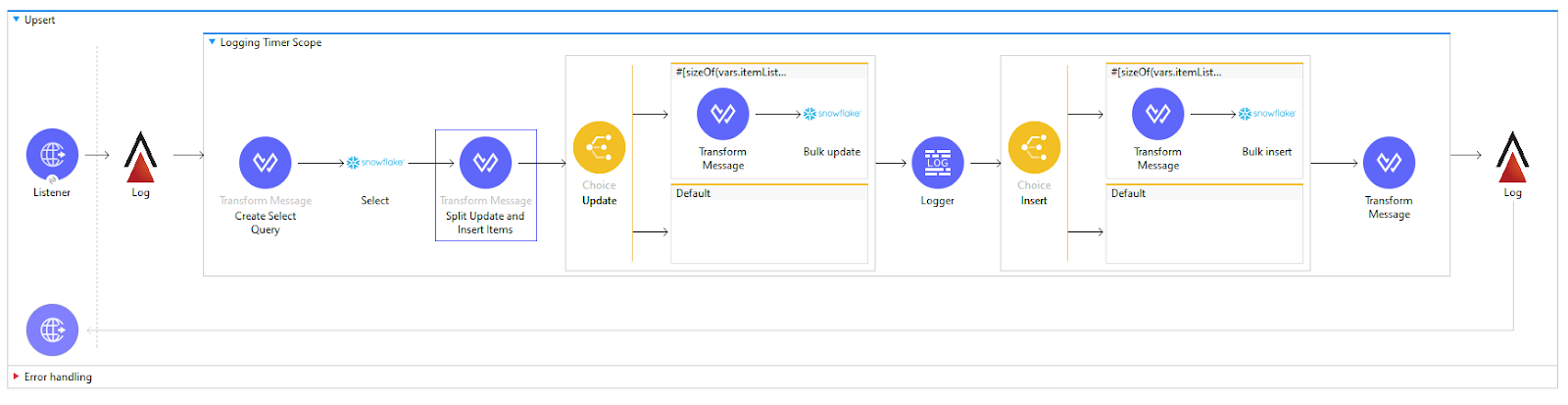
- Check for Existing Records in Snowflake: For each incoming batch, use a query in MuleSoft to check whether the record already exists in the Snowflake target table. This can be done by querying based on a unique key, such as a primary ID.
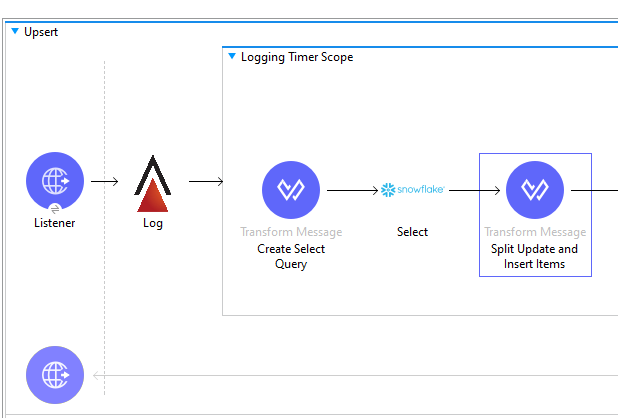
2. Insert or Update Based on the Query Result:
- If the record exists, execute an UPDATE operation to modify the existing record.
If the record does not exist, perform an INSERT operation to add the new record.

Step 2: Optimize Queries for Minimal API Calls
Processing each record individually can lead to too many concurrent requests, which is problematic given Snowflake’s limitations on concurrent write operations. Instead, group records in each request so that a maximum of 3 calls per table per request are made. These could include:
- Call 1: A SELECT query to check for existing records.
- Call 2: An INSERT statement for new records.
- Call 3: An UPDATE statement for existing records.
Approach 2: Use Snowflake Stages and Leverage Merge Operations
By uploading batches of data into Snowflake as CSV files and leveraging its MERGE function, you can streamline the process and minimize the number of individual calls to a particular table.

Step 1: Create a temporary CSV file
The first step in this approach is to structure the data in CSV format with columns that align with the schema of your Snowflake target table.

Step 2: Upload the CSV into a Snowflake Stage
- Once the CSV file is ready, it must be uploaded to a Snowflake stage. Stages are temporary storage areas in Snowflake where files can be loaded before they are processed or inserted into tables.Once the stage is set up, use the Snowflake PUT command to upload your CSV file into the stage.

PUT file://path/to/myfile.csv @my_stage;Step 3: Perform a MERGE Command within Snowflake
The next step is to leverage Snowflake’s powerful MERGE function to process the data. The MERGE function allows you to perform UPSERT operations

MERGE INTO ITEM USING
(SELECT
$1 id,
$2 name
FROM 'inputFile' where metadata$file_row_number > 1) newItem ON ITEM.ID = newItem.ID
WHEN MATCHED THEN
UPDATE SET
ITEM."ID" = newItem.id,
ITEM."Name" = newItem.name
WHEN NOT MATCHED THEN
INSERT(
    "ID" ,
"Name"
)
VALUES
(
newItem.id,
  newItem.name
);
The inputFile in the example above should reference the file uploaded to the stage area. It follows the format '@"TEST_DB"."TEST_SCHEMA"."TEST_STAGE"/stagedFile.csv'Test Results
| Scenario | Records per Request | Approach 1 | Approach 2 |
| Single Request- Multiple Records | 5 | 5063ms | 3020ms |
| Single Request- Multiple Records | 16 | 9346ms | 3400ms |
| Multiple Request – Multiple Records | 5 Requests 16 Records Each | Avg Resp. Time 16044ms | Avg Resp. Time 4245ms |
Conclusion
Moving the UPSERT logic into MuleSoft solves our initial roadblock while reducing Snowflake’s limitations on concurrent write operations by limiting each request to a maximum of three table interactions. However, the alternative approach of creating a CSV file, uploading it to a Snowflake stage, and then performing a MERGE operation is even more efficient. This method avoids direct table interaction during individual requests and takes advantage of Snowflake’s ability to handle bulk inserts and updates effectively. It is more scalable and less chatty. Locally testing using the exact same data sets (see test results table above), we can see solution 2 is significantly more efficient than solution 1.